Amazon Textract – Scrape & Store
Author
Anjani Phuyal
Date
Aug 15, 2022
Category
AWS
Read Time
10 min read
Co-Author: Sushant Paudyal
This blog contains information that will give knowledge to the reader on how to scrape a PDF file using Amazon Textract and store the extracted data in DynamoDB.
Overview
Learn the steps to be taken in carrying out a PDF Scraping solution using Amazon Textract.
Requirement
From various PDFs, only some information must be extracted and stored in a database.
Goals
- To extract contents from PDF using Amazon Textract
- To split multi-page PDFs into multiple files
- To achieve a fully automated system
Architecture diagram
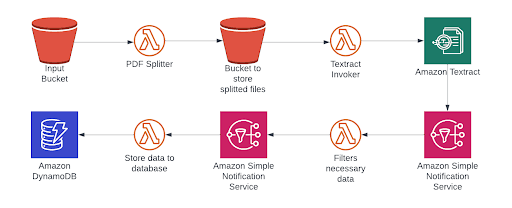
IMPORTANT!!! The Input Bucket and Bucket to store splitted files should be DIFFERENT buckets !!! IMPORTANT
Working Methodology
- Take the PDF and split it into individual pages
- Pass the pdfs to AWS Textract
- Run concurrent lambda to extract necessary information from each page
- Store extracted data in the database
Procedure
1. Take the PDF and split it into individual pages
As shown in the architecture diagram above, an input bucket is created to store the original PDF file. A lambda function 'PDF Splitter' is created and it is configured so as to be triggered from S3. An ObjectCreatedPut Event trigger is set up for the 'PDF splitter' lambda function with the S3 bucket set as the input bucket. The lambda function's runtime is selected as Python 3.8 and various libraries like boto3, PyPDF2, io, os, etc are used to execute the required task. The split files are then stored in another bucket 'Bucket to store split files'
IAM Permissions: AmazonS3FullAccess, BasicLambdaExecutionRole
Code:
import boto3

import botocore
from PyPDF2 import PdfFileReader, PdfFileWriter
import os
from io import BytesIO
import json


s3 = boto3.resource('s3')

client = boto3.client('s3')

def handler(event,context):
    BUCKET_NAME = event['Records'][0]['s3']['bucket']['name']
    KEY = event['Records'][0]['s3']['object']['key']
    s3.Bucket(BUCKET_NAME).download_file(KEY, '/tmp/my_local_image.pdf')
    pdf_path = '/tmp/my_local_image.pdf'
    print(json.dumps(event))


    pdf = PdfFileReader(pdf_path)
    for page in range(pdf.getNumPages()):
        pdf_writer = PdfFileWriter()
        pdf_writer.addPage(pdf.getPage(page))
        fname='output'
        output_filename = '{}_page_{}.pdf'.format(fname, page+1)

        with open("/tmp/{}.format(output_filename)", 'wb') as out:
            pdf_writer.write(out)

            #Upload splitted files to s3 bucket
            client.upload_file("/tmp/{}.format(output_filename)", "Bucket to store splitted files", output_filename)


            print('Created: {}'.format(output_filename))
2. Pass the pdfs to AWS Textract
Now, another lambda function 'Textract Invoker' is created and is triggered by the S3 bucket 'Bucket to store split files'. This function starts the document analysis process using Amazon Textract and sends notifications using SNS as a Notification channel. Amazon Textract feature types like Tables and Queries are defined and the Queries are configured so as to extract the required information.
import json
import boto3


def lambda_handler(event, context):
    print(json.dumps(event))
    print('boto3 version: ' + boto3.__version__)
    name_of_pdf = event['Records'][0]['s3']['object']['key']
    # print(name_of_pdf)
    client = boto3.client('textract')
    response = client.start_document_analysis(
        DocumentLocation = {
            'S3Object': {
            'Bucket': 'Bucket to store splitted files',
            'Name': '{}'.format(name_of_pdf)
        }},
        FeatureTypes=['TABLES', 'QUERIES'],
        NotificationChannel={
            'SNSTopicArn': '<arn:aws:sns:us-east-1:***>',
            'RoleArn': 'arn:aws:iam::***lambda-execution-role'
        },
        QueriesConfig={
            'Queries': [
                {
                    'Text': 'What is the name of the Resident?',
                    'Alias': 'Resident_Name'},
                {
                    'Text': 'What is the Resident #?',
                    'Alias': 'Resident_Number'
                }
            ]}


        )
3. Run concurrent lambda to extract necessary information from each page
The SNS then triggers the lambda function 'Filters necessary data' to concurrently process all the documents and extract necessary data from them. This function then publishes the information to Amazon SNS topic.
Permissions: SNSFullAccess, BasicLambdaExecutionRole
Code:
import json
import boto3


client = boto3.client('textract')
sns_client = boto3.client('sns')

def lambda_handler(event, context):
    print(json.dumps(event))

    message_from_textract = json.loads(event['Records'][0]['Sns']['Message'])
    job_id = message_from_textract['JobId']
    response2 = client.get_document_analysis(
        JobId = '{}'.format(job_id))
    #job_status = response2['JobStatus']
    #print(response2)
    blocks_of_output = response2['Blocks']
    medications = []
    name_and_ssn = []
    print(blocks_of_output)
    for item in blocks_of_output:
        #print(item)
        if item['BlockType'] == 'LINE':
            if item['Text'] == 'Medication':
                medications.append(blocks_of_output[blocks_of_output.index(item) + 1])
        elif item['BlockType'] == 'QUERY_RESULT':
            name_and_ssn.append(item['Text'])


    for item in medications:
        message_to_sns = []
        print(item)
        details = item['Text']
        message_to_sns.append(details)
        message_to_sns = message_to_sns + name_and_ssn
        sns_response = sns_client.publish(
            TopicArn='arn:aws:sns:****',
            Message=str(message_to_sns),
            )

    message_to_sns = message_to_sns + name_and_ssn
    print('message to sns is this:')
    print(message_to_sns)
4. Store extracted data in the database
When the message is published to Amazon SNS topic, the final lambda function 'store to database' is triggered. This function gets the message and puts the necessary item to dynamodb using client.put_item() method. The items put are name, resident number and details.
Roles: DynamoDbFullAccess
Code:
import json
import string
import boto3

client = boto3.client('dynamodb')

def lambda_handler(event, context):
    # TODO implement
    print(json.dumps(event))
    message_id = event['Records'][0]['Sns']['MessageId']
    message_string = event['Records'][0]['Sns']['Message']
    message = message_string.split(',')

    details = message[0][2:-1]
    name = message[1][2:-1]
    resident_number = message[2][3:-3]
    dynamo_response = client.put_item(
    TableName = 'test_table',
    Item = {
        'ss_number':{
            'S':'{}'.format(message_id)
        },
        'resident_number':{
            'S':'{}'.format(resident_number)
        },
        'name':{
            'S':'{}'.format(name)
        },'medication':{
            'S':'{}'.format(details)
        }
    })
Result:
The pdf is processed using Amazon Textract and the required data are inserted into the database table.
Monitoring:
- Cloudwatch logs provide various information regarding various events during the execution of the system.